This article describes how to find volunteers with no recent hours and decide if their SiD volunteer record should be deactivated.
Best practice: volunteers who have no hours at the end of the program year (July-June) should be exited from your ABE program. Otherwise, volunteers who haven't worked with your program for a long time will appear on NRS Table 7.
Find volunteers with recent hours
- Make sure all volunteer time has been entered.
- From the Reports tab, Staff & Volunteer Reports section, choose the Volunteer Snapshot report.
- Set the report date range to the desired program year. Click View Report. Volunteers who have attendance hours in the report date range will appear in the results.
- Keep this report window open or print the Volunteer Snapshot report for the next steps.
Compare Volunteer Snapshot results with Staff & Volunteer Information report
Use the Staff & Volunteer Information report to help determine whether a volunteer's SiD record should be deactivated.
- On the Reports tab>Staff and Volunteer Reports section, choose the Staff & Volunteer Information report.
- For the Active During Program Year filter, choose "true." Click View Report. Then use the report navigation buttons to go to the page for "Volunteers."
The results will show volunteers who had a Program Status - Entry history item in effect at some point during the program year. It doesn't necessarily mean the volunteer had attendance hours during the year.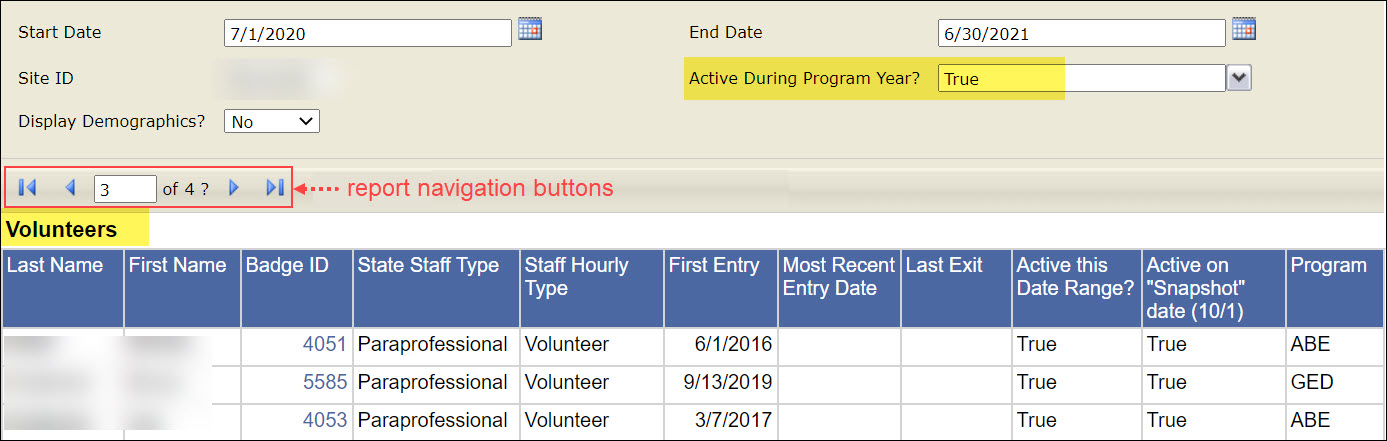
- Compare the names on the Volunteer Snapshot with the search results.
- It's OK if people on the Volunteer Snapshot (volunteers with hours in the last program year) show as Active on the Staff & Volunteer Information report.
- People who do not appear on the Volunteer Snapshot probably should NOT appear on the Staff & Volunteer Information report as Active during the year. An exception would be if a volunteer very recently joined your program as a volunteer.
- Deactivate volunteer records for people who have not earned hours in the last program year. Follow the directions in this help article: Deactivate or Reactivate Volunteers
0 Comments