Q: Once an online registration comes in to SiD via E_Intake, is there a way to delete it? Or is it there forever?
A: You can delete an E_intake row if it has not been marked by a staff member as "processed."
A Delete this E_Intake link will appear on the bottom of the E_Intake display screen if this option is available.
Caution: Use the delete feature to remove practice registrations created by your staff, or duplicate registrations for the same person. Don't go overboard and delete all E_intakes. Keep those for historical reference.
To delete an E_intake entry
- In SiD, click the E_Intake tab.
- For the row to be deleted, make sure the Processed box at the beginning of the row does not have a check mark. (You cannot uncheck the Processed box.) Select the row.

- On the E_Intake Information screen, click the Delete this E_Intake link at the bottom of the page. Follow the prompts.
If the link is not visible, the record has already been marked as processed and cannot be deleted.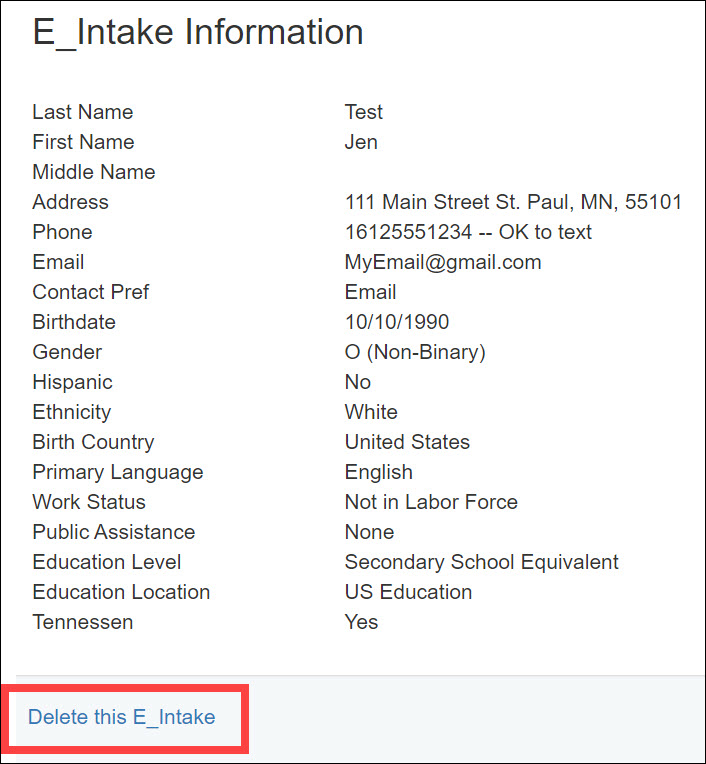
0 Comments