Related: FAQ: Can't See Future Classes on the Dashboard
Q: I am the teacher in a new class that will begin a couple of weeks. How can I enroll students in the new class now?
A: The answer depends on your SiD login privileges.
- Staff with Teacher level logins cannot enroll students in a class before the date the class begins.
- Staff with Admin level login privileges can enroll staff, volunteers, and students before the class begins.
Tips for adding people to future classes (Admin login only)
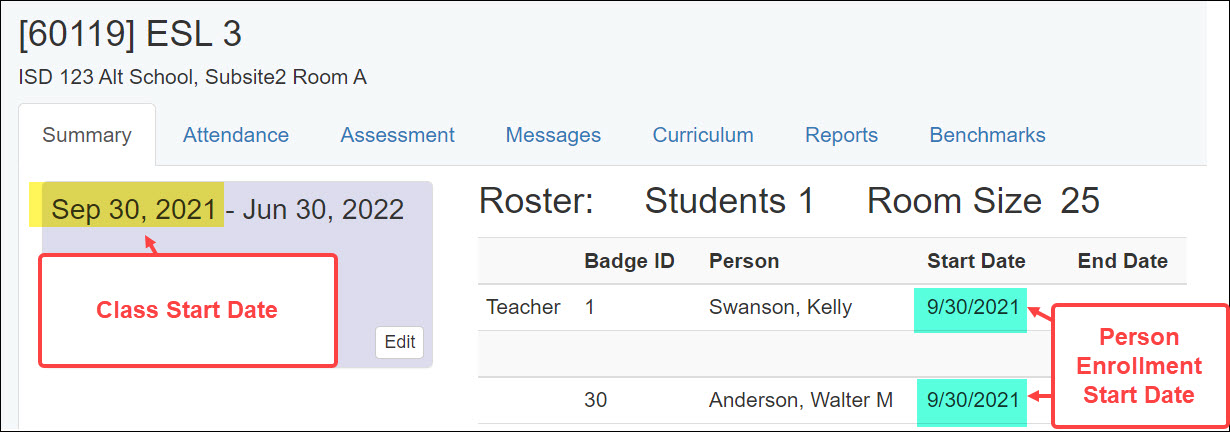
- Make sure the person's enrollment Start Date is on or after the date the class begins.
- It's not possible to enroll the teacher in the class before the class Start Date. In the example below, staff, volunteers, and students can be enrolled in the class on Sept 30 or later.
- Think carefully before adding many students to future classes. It's possible not all will actually attend.
- When a student has been enrolled in a class but never shows up, you have a couple of options.
- delete the student's enrollment rather than giving an enrollment End Date. There will be no record that the student was ever enrolled in the class.
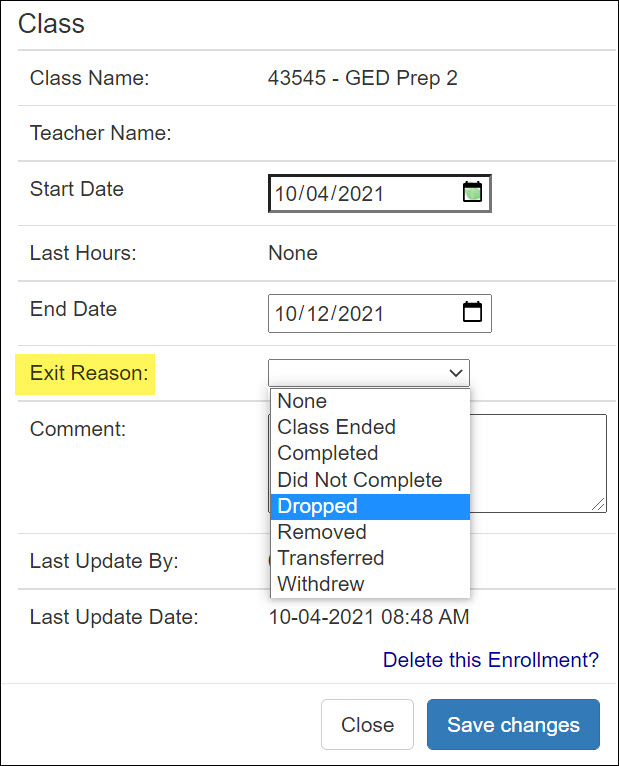
OR - give the student an Enrollment End Date and an Exit Reason. This allows you to see students who registered but never showed up to class.
- delete the student's enrollment rather than giving an enrollment End Date. There will be no record that the student was ever enrolled in the class.
0 Comments