Check the person's enrollment status at your site.
Scenario A: If the staff person is no longer working in your program, remove the staff login.
• In the Active Login? column, click the Yes link to go to the Staff>Account screen.
• Click the Remove Login Rights button.
• Also, if they have a recent Last Login Date, find out why they (or another staff person) logged in with their credentials.
Scenario B: If they are currently working at your site again (hint: they might have logged in recently), give them an updated Program Entry or Re-entry date.
• Click the staff person's Badge ID in the table. Then navigate to the Staff>History screen.
• Add a new Program Entry or Re-Entry history item to the staff record.
Staff Shared with Other Programs
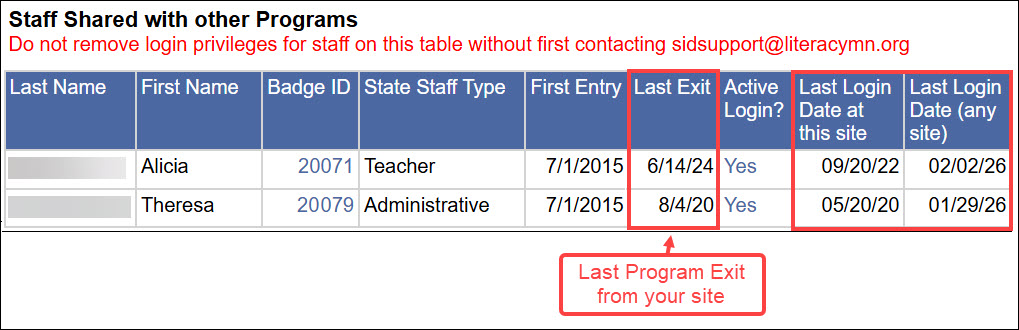
This table shows people who have a SiD staff record that is shared with one or more MnABE programs. Staff have been given a Program Exit history item for your site. These staff still have an active login, meaning they can still log in to SiD. But they can no longer see data in your SiD site. The Last Login Date at This Site column shows the last time the staff person logged into your SiD site.
Please do not remove login access for shared staff until you’ve checked with us at sidsupport@literacymn.org. Removing login rights for shared staff will block them from all SiD sites—including ones where they are still actively working. A quick check with us helps keep everything (and everyone) running smoothly.
If you accidentally delete login privileges for a shared staff record, contact us at sidsupport@literacymn.org. We'll help you get in touch with the shared program to restore the staff login.
0 Comments