This article discusses the location of Staff/Volunteer items that appear on Table 7. While the wording below says "staff," the same info applies to volunteers, too.
NRS Table 7 counts staff and volunteers for NRS reporting purposes. Staff and volunteer info must correctly show active staff. View staff details on the Reports tab> Staff and Volunteers Reports section, Staff & Volunteer Information report.
Staff tab
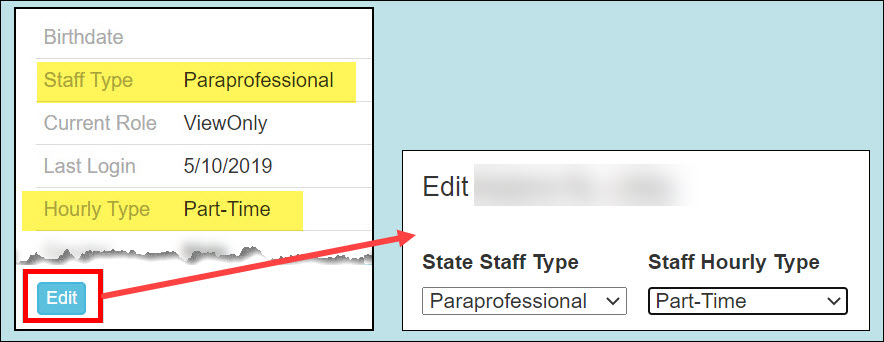
This screen displays State Staff Type and Hourly Type. Edit these two fields on the Staff>Summary tab. (See directions below.)
The Staff grid also has an Active column, which is for information only. It is unchecked for staff who have been given a program Exit Date on the Students>History screen. This column should accurately reflect whether or not staff are currently working in your ABE program. Note: You cannot manually check or uncheck the Active box. Instead, see this article to learn how to deactivate or reactivate staff.

Staff>Summary tab
The left side of the Staff>Summary screen shows the State Staff Type and Hourly Type used on Table 7. Click the Edit button to update staff details.
Staff>History tab
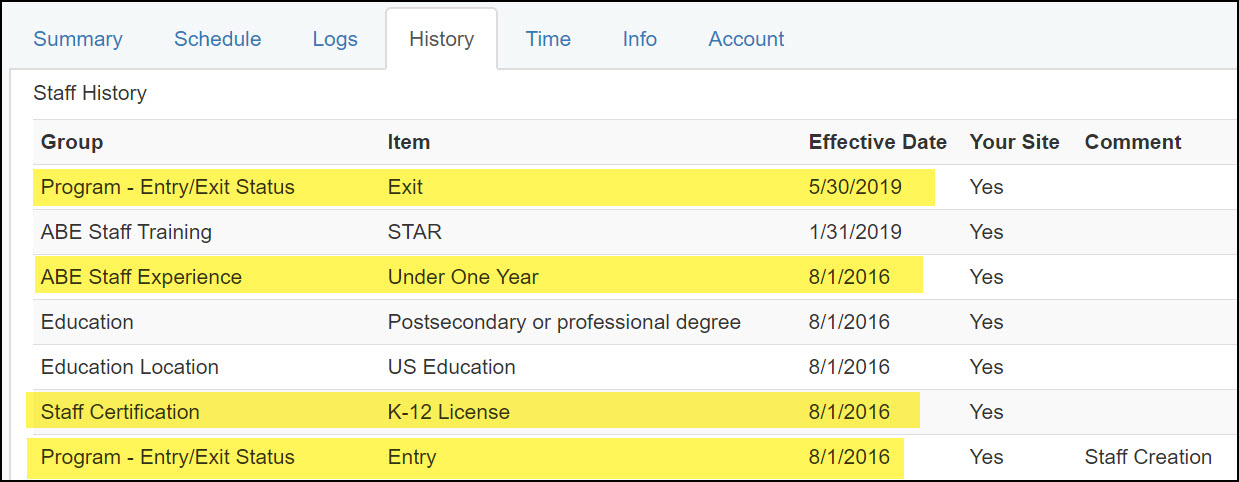
Use this screen to update a person's program entry/exit status, or add teacher experience and certification.
For ALL STAFF: A Program-Entry/Exit Status> ENTRY item is automatically set when the staff record is created.
Be sure to add a Program-Entry/Exit Status> EXIT item when a staff person is no longer working with your program. (And don't forget to remove SiD login privileges, if any!)
For TEACHERS ONLY: make sure Staff Experience and Staff Certification history rows are completed.
- ABE Staff Experience: This reflects the person's experience when they first began working in your ABE program. There is no need to edit the initial Effective Date. SiD will AUTOMATICALLY calculate the number of years of experience for the report dates you enter.
- Staff Certification: Add certifications as they occur.
For teachers with a Tier 1 license in ABE, choose "adult education." If they have a Tier 1 license in some other K-12 area, choose "K-12 license."
0 Comments